
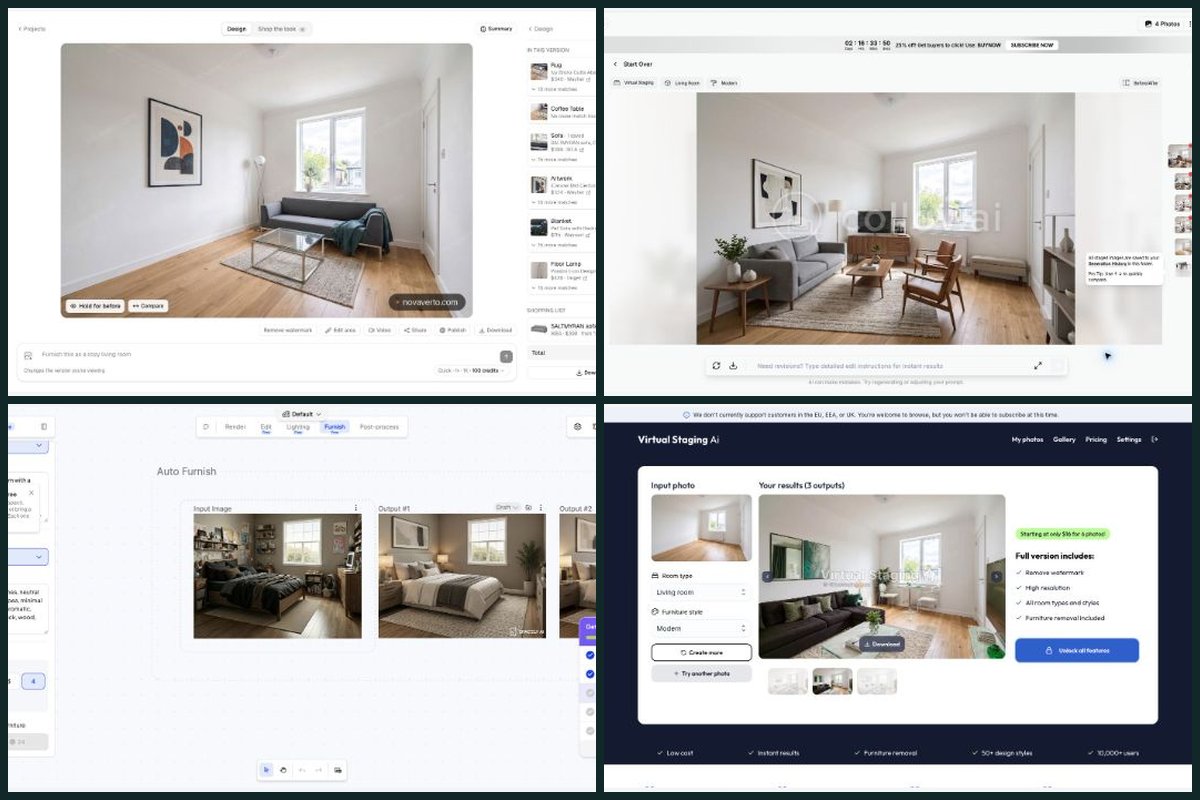
Decor8 advertises a broad design subscription. I prefer NovaVerto because I could actually work through a free room design and shopping step, then inspect the models, focused tools and project controls around that result.
I’m a co-founder of NovaVerto. This comparison explains why I prefer its workflow, using the original September browser trial and the product review on 3 October.
Where NovaVerto makes the difference against Decor8 AI
I’ve chosen these comparison points specifically for Decor8 AI. The final column explains why each matters to my preference for NovaVerto; it does not treat an untested competitor feature as absent.
| What matters in this comparison | NovaVerto | Decor8 AI | Why it matters to my choice |
|---|---|---|---|
| Try a production result before choosing a plan | Yes — Modern room generated; new Redesign flow inspected. | Paywalled — September signup and onboarding reached a subscription screen; no production render completed. | I completed a NovaVerto design and shopping step through free access. Decor8’s September onboarding ended at subscription access, so I could not make the same firsthand check there. |
| Take the design toward actual purchases | Yes — Retailer matches and saved list; current Pieces/List UI inspected. | Paywalled — An in-project retailer-matching workflow was not established; private production access was not reached. | NovaVerto’s retailer-match and saved-item path was used. I did not establish an equivalent private shopping workflow in Decor8, so the advantage here is a demonstrated path for my project. |
| Keep offers and a list total in view | Yes — Offers per piece, prices, list total and area re-selection. | Paywalled — Equivalent offers, saved shopping list and total were not established behind the subscription gate. | The inspected Pieces and List panels make my next purchasing decisions concrete. Decor8’s offer and list behavior remains unconfirmed behind the access limit. |
| Choose the model for the next run | Yes — 11 model families, search, filters and visible credit costs. | Paywalled — A comparable named-model picker was not established because the September trial stopped at subscription access. | NovaVerto’s named-model families, filters and costs were visible in the working project. A comparable Decor8 control was not reached. |
| Set a palette and budget as part of the brief | Yes — Room, 23 styles, palette and budget; custom descriptions. | Advertised — Room/style selection or a written description; current website lists 56+ styles. Paid editor not tested. | Decor8 offers plenty of style choices. I prefer NovaVerto’s mix of style, palette, budget and written details to guide one room. |
| Open a specific room-detail control | Yes — Walls, floor, lighting, windows and doors in the inspector. | Advertised — Paint, cabinet colors and image enhancement advertised; production editing not exercised. | Decor8 advertises paint and cabinet tools. NovaVerto also exposes floor, lighting, window and door entry points in the inspector I checked. |
| Give chosen furniture its own placement step | Yes — Reference images; up to four furniture pictures/catalogue pieces. | Paywalled — Exact reference-image or selected-furniture placement flow not established behind the subscription gate. | I can start NovaVerto placement with catalogue pieces or pictures and inspect room-preservation settings. The equivalent private Decor8 flow was not tested. |
| See the original and version sequence | Yes — Original plus version history, Hold for before and Compare. | Paywalled — Private project history and comparison controls were not reached in the September trial. | NovaVerto’s current history and comparison controls were directly inspectable. I cannot judge Decor8’s private history from onboarding slides. |
| Move between jobs inside the project | Yes — Touches → More tools: 28 tools within the project. | Advertised — Redesign, staging, color visualization and photo tools advertised across web and mobile. | NovaVerto’s More tools picker opens task settings around the room. That suits the way I alternate between a big redesign and small refinements. |
| Switch the next run to staging or clearing | Yes — Virtual Staging and Declutter & Repair in the tool picker. | Advertised — Virtual staging and clutter removal documented; onboarding examples were not completed production actions. | Both products advertise staging-related work. I prefer NovaVerto’s explicit task choices in the same project I have already generated with. |
| Plan another part of the home | Yes — Exterior, garden, outdoor planner, balcony and front door. | Advertised — Twilight property-photo tools advertised; comparable garden/balcony planning was not established. | NovaVerto exposes dedicated garden, balcony and exterior tasks. Decor8’s twilight-photo claim does not by itself establish an equivalent outdoor planning workflow. |
| Choose a render configuration and see its cost | Yes — Live credit estimate beside model, speed, size and variants. | Advertised — $14.99/month for advertised unlimited app designs; the separate API is listed at $0.20/image. | NovaVerto’s estimate lets me decide what to spend on a particular model and size. Decor8 uses a different, advertised flat-rate app model; this is a control preference, not a lowest-price claim. |
Tested = I ran it, in the September trial or the 3 October revisit. Seen / Not found (free plan) = what the free account showed on 3 October; not found there does not mean the paid product lacks it. Advertised = documented by the vendor, often on higher plans. Paywalled = my trial stopped at a subscription screen. Unconfirmed = I could not establish it either way. Edge = a specialist case where I would pick the competitor. NovaVerto’s column was checked in the logged-in app on 3 October. This is a workflow comparison, not a controlled image-quality score. Sources and test scope.
NovaVerto in short
We built NovaVerto around the steps that come after “that room looks nice.” A new design starts with one of three routes, Redesign, Place furniture or Run a tool, and every run stays in the same project: the original photo, numbered versions, Hold for before and Compare.
More tools opens 28 focused tools from the room itself, from walls, floors, lighting, windows and doors to staging, decluttering, exterior, garden and balcony design. The model picker covers 11 model families with search, filters and the credit cost shown before I run: 65 credits for NovaVerto AI, 126 to 176 for the Gemini options at 1K.
After the render, Catalogue, Pieces and List turn the room into retailer offers with prices, a saved shortlist and its total. Placing furniture accepts up to four catalogue pieces or furniture pictures.
The full NovaVerto walkthrough in my comparison of all eleven tools covers each of these in more detail.
Decor8 AI: I could inspect NovaVerto’s working project, while this trial stopped at a subscription
Website: Decor8 AI
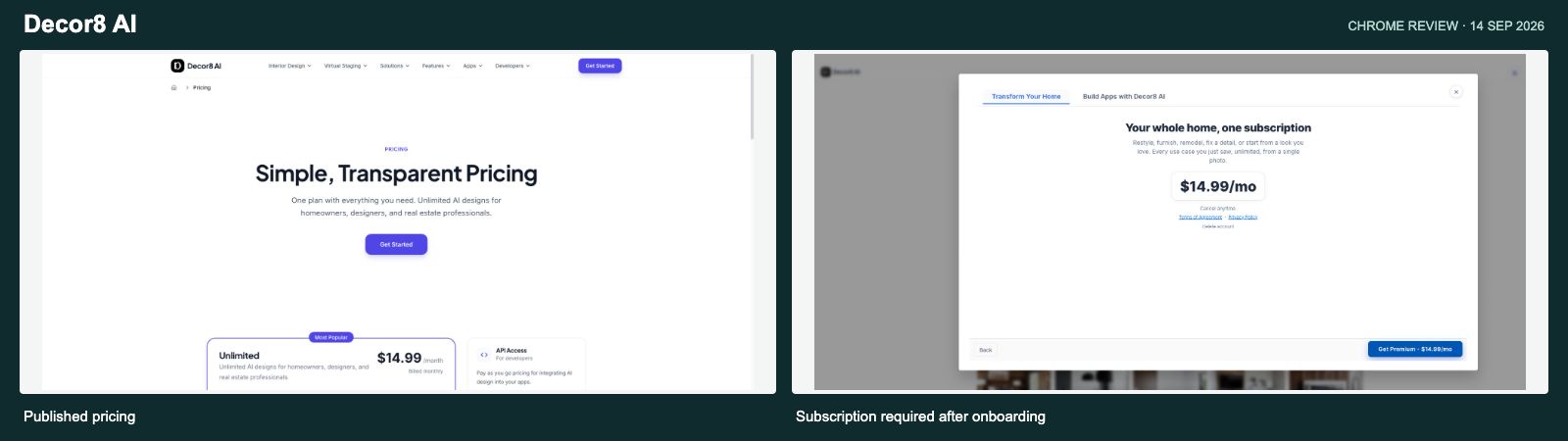
Decor8’s offer is easy to understand on paper: one app subscription for room redesigns and several related design jobs. Its current pages list staging, paint and cabinet visualization, photo enhancement and access across several platforms. Those are useful overlaps with NovaVerto. Decor8’s product features
My September experience was mostly onboarding. Google sign-in worked, then I moved through a long sequence of feature slides. At the end, the app showed a $14.99/month subscription screen. Its exit control said “Close and sign out.” I did not find a free production route through that flow, and I did not buy a subscription.
That means I can describe the access experience, but I cannot give Decor8 an output-quality score. The staged rooms and furniture examples in onboarding were demonstrations. They were not images I had generated with its production tools.
NovaVerto gave me a more useful basis for the decision. I completed a room design, opened product suggestions and saved an item. On the later revisit I could inspect the original, numbered versions, model choices, direct surface controls and the More tools picker around that project. Those are the steps I want to judge before building a longer home-design process around an app.
The product list alone does not settle the comparison for me. Decor8 advertises paint and cabinet changes, while NovaVerto exposes a wider set of directly inspected room-detail entry points. I prefer being able to move from a full redesign to walls, floors, lighting, windows, doors or furniture placement, with the room and its shopping panels still nearby. I did not reach Decor8’s private editor to establish the equivalent arrangement there.
The current pricing page still lists $14.99 monthly for advertised unlimited app designs. That is a different pricing model from NovaVerto’s credits. At ten designs in a month, the subscription would average about $1.50 each; at 100, about $0.15. Those are usage examples, not guaranteed output quality or a fixed per-image tariff. Decor8’s separate API is listed at $0.20 per image. Decor8 pricing
My preference for NovaVerto rests on its demonstrated design-to-shopping workflow and visible run controls. A flat fee on another service does not tell me whether I can make the same furniture, model and revision decisions in the way I want.
Why I prefer NovaVerto: I’d choose NovaVerto for the workflow I could follow through: create a room, compare revisions, refine a detail and save furniture. Decor8’s subscription deserves a look on its own terms, but my trial did not reach a production editor or establish that same path.
What a NovaVerto render actually costs
The cheapest current NovaVerto render is 65 credits. The current Standard offer is $17.99 for the first month, then $24.99 per month, with 7,000 credits per month. I’m showing both rates so the introductory saving and the ongoing cost are clear. Annual discounts are not used in these calculations. NovaVerto pricing
| Observed setup | Credits | $17.99 first month | $24.99 regular month |
|---|---|---|---|
| NovaVerto AI · cheapest render | 65 | $0.17 | $0.23 |
| Gemini · Fast · 1K | 126 | $0.32 | $0.45 |
| Gemini · Balanced · 1K | 149 | $0.38 | $0.53 |
| Gemini · Best · 1K | 176 | $0.45 | $0.63 |
Calculation: the monthly price ($17.99 introductory or $24.99 regular) ÷ 7,000 × the displayed credit cost. These are allocation estimates, not separate pay-per-image prices. They assume the allowance is fully used and exclude credits spent on other actions. At 65 credits, 7,000 credits cover 107 complete renders with 45 credits left; dividing the full month’s charge across those 107 renders rounds to $0.17 with the introductory offer or $0.23 at the regular price. The introductory rate applies to the first month, not every renewal. Other models, sizes and variant counts change the cost.
The current plan cards list watermark-free renders and API access on Standard. Pro is $49.99 monthly for 13,000 credits and includes 2K/4K output; those resolutions were disabled with a Pro requirement in the free account I inspected. One-off credit packs are also available, with a 30-day validity period. Plans and credit packs
Decor8 AI price context
The $14.99/month app subscription was reconfirmed on Decor8’s public pricing page on 3 October. Its advertised unlimited plan has a usage-dependent average cost, while the API is priced separately. NovaVerto’s separate table retains the $17.99 first-month offer and $24.99 regular monthly price.
| Tool | Reference paid entry | Approximate unit cost on that basis |
|---|---|---|
| Decor8 AI | $14.99/month, advertised unlimited app designs; reconfirmed on the October public page | No fixed unit rate: ≈$1.50 at 10 designs/month or ≈$0.15 at 100. Separate API: $0.20/image. |
Credits, source photos and unlimited plans represent different units. Unit-cost estimates assume full use of the relevant allowance; they do not measure rendering quality.
Why I’d choose NovaVerto
I’d choose NovaVerto for the workflow I could follow through: create a room, compare revisions, refine a detail and save furniture. Decor8’s subscription deserves a look on its own terms, but my trial did not reach a production editor or establish that same path.
My starting point: use the 65-credit NovaVerto AI option for an initial direction, then explore the focused tools and furniture options around that result. At full allowance use, that is about $0.17 per render with the $17.99 first-month offer, or $0.23 at the regular $24.99 monthly price. Explore NovaVerto
Sources and what I actually checked
The original browser trials took place in September 2026. The September trial completed signup and onboarding but reached a subscription gate. No Decor8 production render was completed. NovaVerto also had a completed redesign and a saved shopping-list item. Photos, modes and prompts differed, so these observations are not a controlled image-quality benchmark.
On 3 October I inspected NovaVerto’s logged-in project workspace, New project/New run dialogs, Touches and its 28 tools, focused wall settings, model picker, speed and size menus, furniture-placement controls, shopping panels and live pricing. No new render or paid purchase was submitted during that revisit.
Official product and pricing pages were checked again on 3 October. Controls I inspected, completed September actions and vendor-documented features are labelled separately. Older prices stay dated where current amounts were not verified.
September trial and October public-source check: The September account reached onboarding and a subscription gate. No production render, private shopping workflow or history check was completed. October public pricing still advertises $14.99/month; current private free access was not retested.
- NovaVerto: tool catalogue, pricing, assistant integration, and the logged-in UI inspection described above.
- Decor8 AI: current features and app subscription and separate API pricing; September onboarding and subscription gate recorded in the September trial. No completed production render. October public pages rechecked; no new private-login test.
Disclosure: I’m a co-founder of NovaVerto. The recommendation reflects my preferences and the workflow we’re building. Observed controls, earlier completed tests and vendor claims are distinguished throughout; access to a tool does not guarantee identical results across photos or models.
More comparisons
All eleven tools side by side: Best AI Home Design tools 2026. One to one: NovaVerto vs MeltFlex · NovaVerto vs Virtual Staging AI.