
I wanted to get past the polished before-and-after pictures. How easy is it to start? What does the free version actually let you do? And does the tempting monthly price still look good once you understand the credits?
I’m the person behind NovaVerto, so there’s an obvious connection here. I’ve included my own product in the same comparison, including the bits that need work.
This is a browser trial and buying guide, based on public websites and the free access I could reach in Chrome. I completed real renders in ten products: NovaVerto, RoomGPT, REimagine Home, Collov AI, Spacely AI, HomeDesigns AI, MeltFlex, Paintit.ai, Remodel AI and Virtual Staging AI. Interior AI and Decor8 required paid production access, so I stopped at their access gates. That limit is part of the research, not evidence that those tools produce bad results.
NovaVerto, RoomGPT Basic, Collov, HomeDesigns AI, MeltFlex and Virtual Staging AI used the same public empty-room photo. REimagine Home, Spacely and Remodel AI used their own built-in samples; Paintit used a living room from its public community gallery. Modes, prompts and output counts differed, so this is a practical first-use comparison, not a controlled image-quality benchmark. The screenshots below show what I actually reached, including access gates where a private editor wasn’t available.
| Tool | Best fit | Pros I found | Cons / catches | Lowest paid entry I could verify | Approximate image cost* |
|---|---|---|---|---|---|
| NovaVerto — my product | Design ideas followed by a shopping list | Broad set of focused tools; retailer matches and saved lists worked | Free watermark; some shopping matches were wrong | $149.99/year, about $12.50/month; or $24.99 monthly | Standard $24.99/month, 7,000 credits: Quick ≈$0.36; Pro model ≈$0.64–$0.96 |
| RoomGPT | Occasional room inspiration without a subscription | Simple editor; free Basic render and download worked; one-off packs | Basic substantially changed the room’s architecture; free credit cannot run default Pro | No subscription shown; packs start at $9 | $9 one-time pack, 30 credits: Basic $0.30; Pro $0.60; Ultra $1.20 |
| Interior AI | Large advertised render allowances and presentation features | Sketch/SketchUp workflows; video and immersive 3D advertised | Paid access before testing; entry plan has fewer tools; conflicting staging copy | $349/year, about $29.08/month; or $49 monthly | Pro $49/month, 1,000 designs: $0.049 per entry-model image |
| REimagine Home | Guided staging and conversational redesign | Five-image free trial; successful staging kept key room features | Free watermark; cheapest plan excludes the newer chat/shopping workflow | $19/month Essential; $36/month for Pro | Essential $19/month, 30 credits: ≈$0.63 per basic one-credit image on the legacy tier |
| Collov AI | Repeated staging variations for listing photos | Four variants for one trial photo; main room structure preserved | Large free watermark; removal enabled by default on an empty room; no credit rollover | $228/year, equivalent to $19/month; or $27 monthly | Standard $27/month, 60 photos: $0.45 per new source photo, including staging variations |
| Spacely AI | Designers who want a canvas and several editing tools | Four real bedroom variations generated; detailed creative controls | Steeper onboarding; credit estimates differ by tool and configuration; free watermark | $240/year, equivalent to $20/month; or $25 monthly | Personal $25/month, 500 credits: $0.25 at 5 credits; four-output removal batch ≈$0.30 per output |
| HomeDesigns AI | A broad toolkit with a low advertised annual entry | Free render without signup; one-credit cost confirmed; wide paid feature list | Free result stayed empty and changed the doorway; limited free choices; pricing/FAQ mismatch | Displayed CHF8/month billed yearly; CHF24 monthly | Standard CHF24/month, 100 credits: CHF0.24 per one-credit photo redesign |
| MeltFlex | Broad home-design ideas with furniture tools | Coherent free room design; original openings preserved; extensive tool menu | Free watermark; this Quick result’s Summary listed no furniture; displayed cost exceeds the cheapest advertised render estimate | CHF11.99/month billed yearly; promotional CHF18.99 monthly | Regular Standard CHF24/month, 650 credits: ≈CHF0.37 for the observed 10-credit Quick setup |
| Decor8 AI | A simple flat-rate subscription | Broad tools under one plan; web and mobile access | Long onboarding ended at a paywall; no free production render reached | $14.99/month; FAQ claims 20% annual saving, about $11.99/month before rounding | $14.99/month, unlimited claim: no fixed unit price; 100 images/month ≈$0.15 each |
| Paintit.ai | Targeted edits through a chat interface | Free edit changed sofa and wall colors while keeping the layout; clear model credit menu | Higher models and export rights depend on plan; furniture matching not tested | Promotional $14.99/month Starter | Regular Starter $29.99/month, 500 credits: 3-credit Lite ≈$0.18; tested 10-credit model ≈$0.60 |
| Remodel AI — ReImage AI | Straightforward home renovation concepts | Eight free generations granted; kitchen retry produced a useful result | URL import failed; first render timed out and reduced the counter | $49.99/year, about $4.17/month; or $9.99/week | N/A on this basis: only weekly and annual subscriptions were verified; no monthly or one-time plan |
| Virtual Staging AI | Listing photos and repeated staging options | Three free outputs; room structure preserved; download worked | Free watermark and only two room types; EU/EEA/UK subscription restriction displayed | $192/year, equivalent to $16/month; or $25 monthly | Basic $25/month, 6 photos: ≈$4.17 per new source photo, including staging variations |
Prices recorded in Chrome on 14 September 2026; image-cost calculations revised on 15 September 2026. The last column uses each service’s lowest-priced paid monthly plan, or its lowest-priced one-time pack, at the regular listed price before discounts. It excludes introductory offers, annual-billing savings and cheaper unit rates from larger plans or packs. Annual and promotional offers shown elsewhere are not the basis for this column. Dollar amounts are USD; CHF is kept as displayed. Estimates assume full successful use of the allowance in the named mode, with no credits spent on other actions. A source-photo allowance can include multiple output variations. Unlimited plans have no fixed per-image rate; the Decor8 example assumes 100 images in one month. Remodel AI has no verified monthly or one-time option, so no comparable figure is invented. See the individual sections for sources and other billing choices.
NovaVerto: my top pick for all-around AI home design. Prodigy of 2026
Website: novaverto.com
I built NovaVerto around the steps that come after “that room looks nice.” For the mix of home-design jobs I care about, it’s my all-round pick for 2026. The catalog has 31 focused tools: 15 for rooms and furniture, five for walls and floors, five for outdoor spaces, five for staging and rendering, and one for commercial spaces. That includes less obvious jobs such as lighting, wallpaper, balcony layouts, decluttering and floor-plan concepts, alongside whole-room redesign. NovaVerto tool catalog
Those tools share an engine; I’m not claiming 31 separate technologies or that I generated with every one of them. The practical appeal is having those jobs, product suggestions and saved shopping lists in the same workspace. I’ve included a feature evidence appendix showing the overlap with competitors and which parts I actually tested.
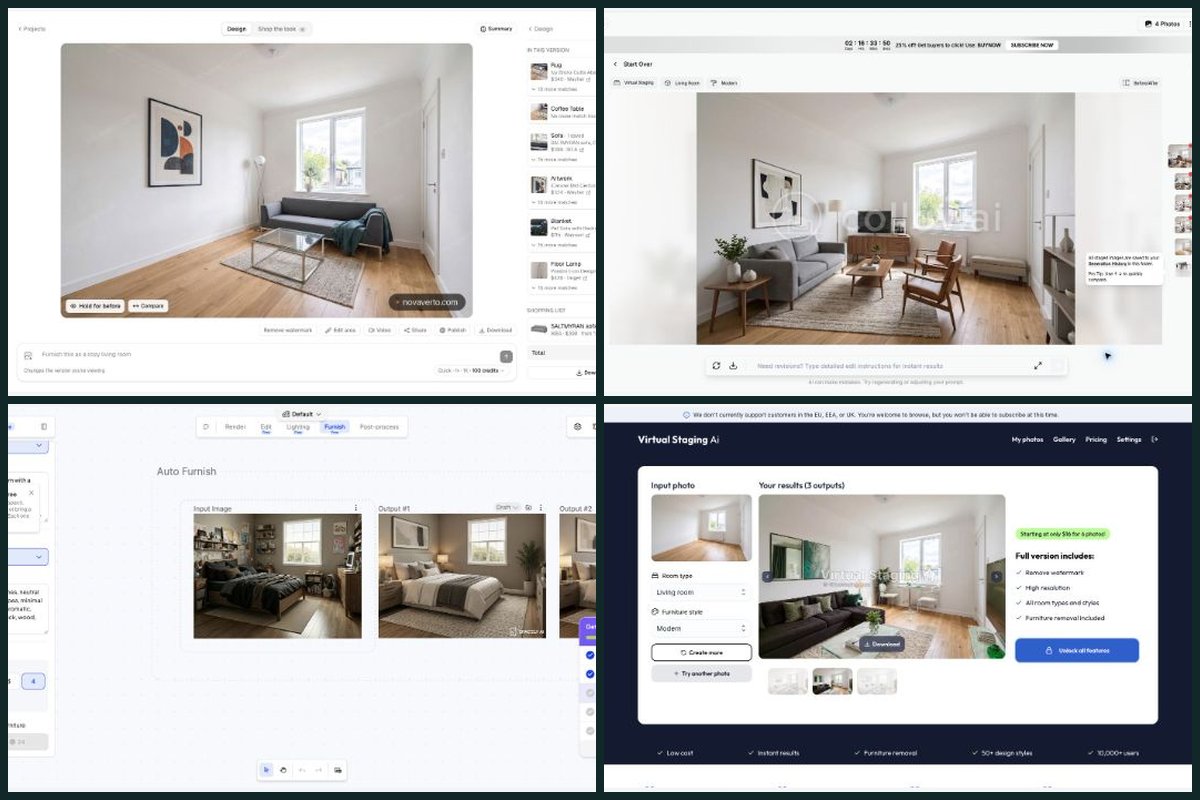
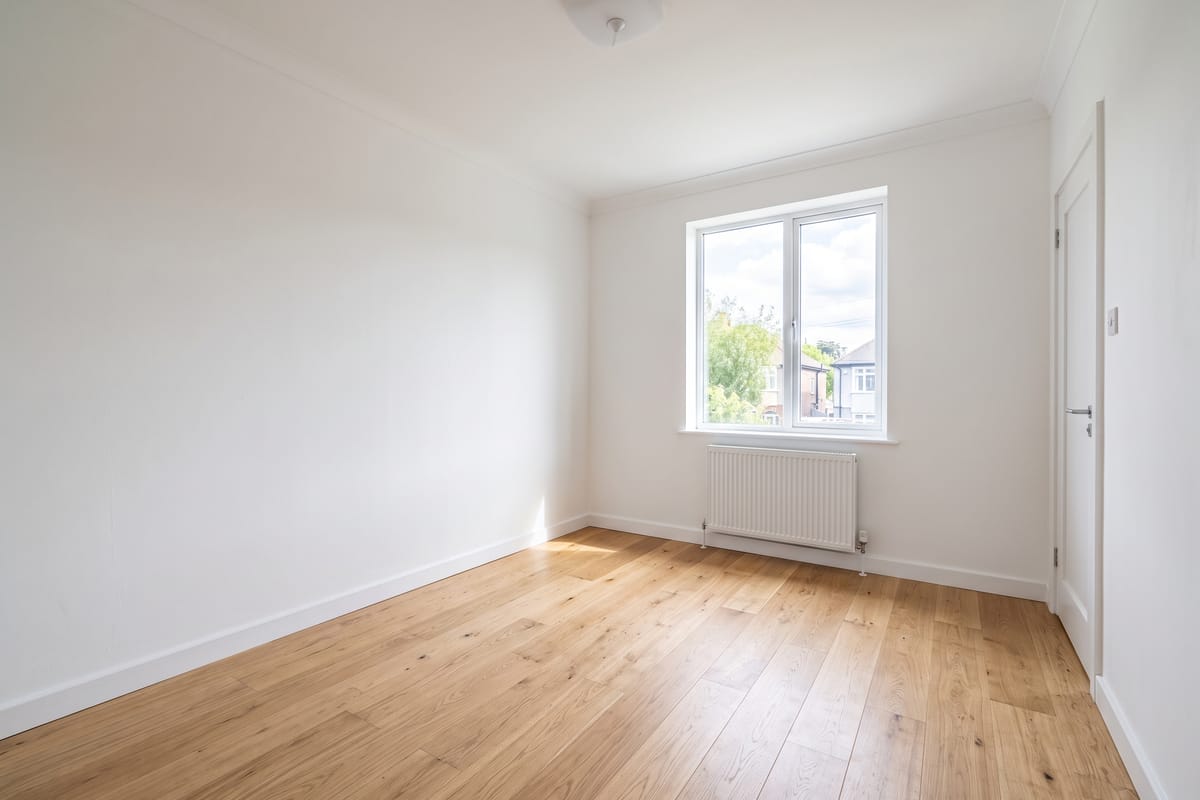
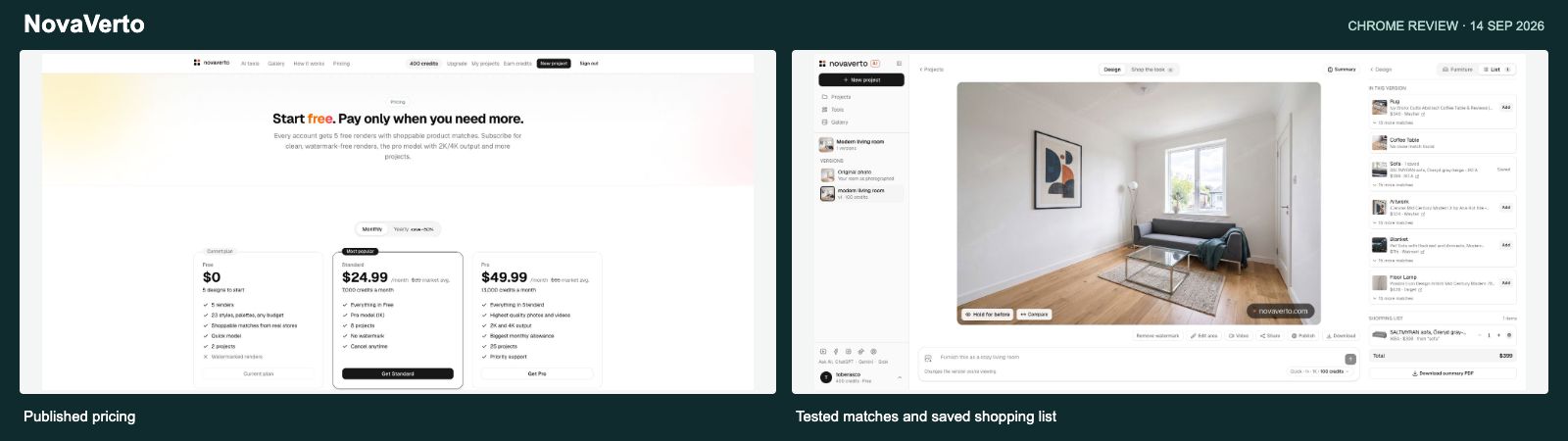
In this test, I used the built-in empty living room and generated a modern design with the Quick model. It added a sofa, coffee table, rug, artwork and lighting while keeping the main room openings recognizable. One render used 100 of the 500 free credits.
Using that same photo elsewhere made the difference easier to see. RoomGPT’s free Basic result substantially changed the architecture, while NovaVerto Quick kept the original room recognizable. Collov and Virtual Staging AI also did a good job preserving it, so this wasn’t a unique win for NovaVerto. It was a useful reminder to compare the actual mode and result, not just the brand name.
Then I tried the shopping flow. It returned retailer suggestions, and I saved a $399 IKEA sofa to a list. That step worked. But the matches also gave me a useful reality check: a detected rug was matched to a coffee table, a blanket to a pet sofa, and one coffee table search found no close match. These are suggestions to check, not a guarantee that every generated object is a real, correctly identified product. The free render also had a prominent watermark.
Standard costs $24.99 monthly or $149.99 annually and includes 7,000 credits per month. Pro costs $49.99 monthly or $299.99 annually with 13,000 monthly credits. Quick images use 65 credits; Pro uses 176–283 depending on resolution. For example, annual Standard works out to about $0.12 per Quick image or $0.31 for a 176-credit Pro image, assuming full use. Monthly Pro at 283 credits is about $1.09 per image. NovaVerto pricing
My take: NovaVerto is a strong fit if you want several home-design tasks and shopping follow-through together. I’d still double-check the product matches. And I won’t pretend it is the only broad toolkit in this comparison.
RoomGPT: best for a few quick ideas without another subscription
Website: roomgpt.io
RoomGPT is easy to understand: upload a room, choose its type and a style, then generate. There’s much less interface to learn than in a large design canvas. I also like the one-off credit packs if you only want to experiment occasionally. RoomGPT
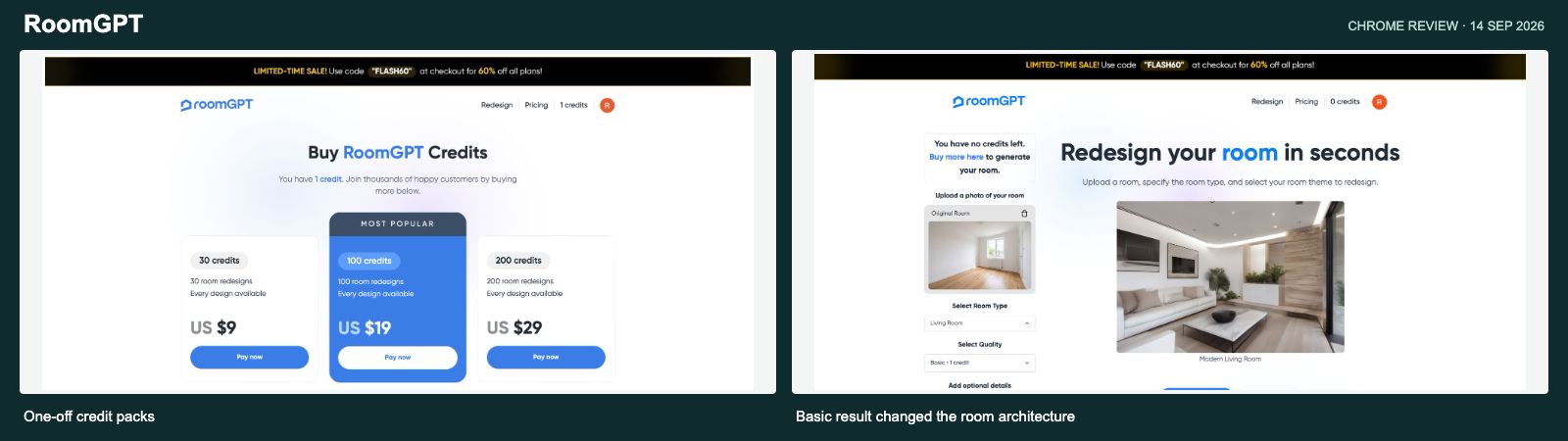
Google signup gave me one free credit. The first snag was that the editor defaulted to Pro, which costs two credits. Basic/Legacy costs one, so I switched to that, chose Living Room and Modern, and generated successfully. Downloading the result worked too. The optional custom prompt was disabled in Basic, which limited how much direction I could give it.
The picture looked appealing as a modern-room idea, but it was no longer a faithful view of my room. The narrow space became much broader, the window arrangement changed, large glazing appeared on the right, and the ceiling gained elaborate recessed lighting. That might be fine for open-ended inspiration. It’s a problem if I want to see new furniture in the room I actually have. This observation applies to the free Basic/Legacy result I tested; I didn’t test Pro or Ultra.
The packs were $9 for 30 credits, $19 for 100, and $29 for 200. Basic uses one credit, Pro two, and Ultra four. That makes a Basic image roughly $0.145–$0.30, while Ultra is roughly $0.58–$1.20. This matters because a pack described as a number of “room redesigns” doesn’t buy that many results in every quality mode. Saving rooms in a dashboard was also listed as coming soon on the purchase page. RoomGPT credit packs
My take: easy to try for occasional inspiration, with a useful one-off purchase model. Based on my Basic result, I wouldn’t rely on it for faithful property staging. I’d choose the quality mode first and calculate the pack around that.
Interior AI: impressive advertised scope, but a paid first step
Website: interiorai.com
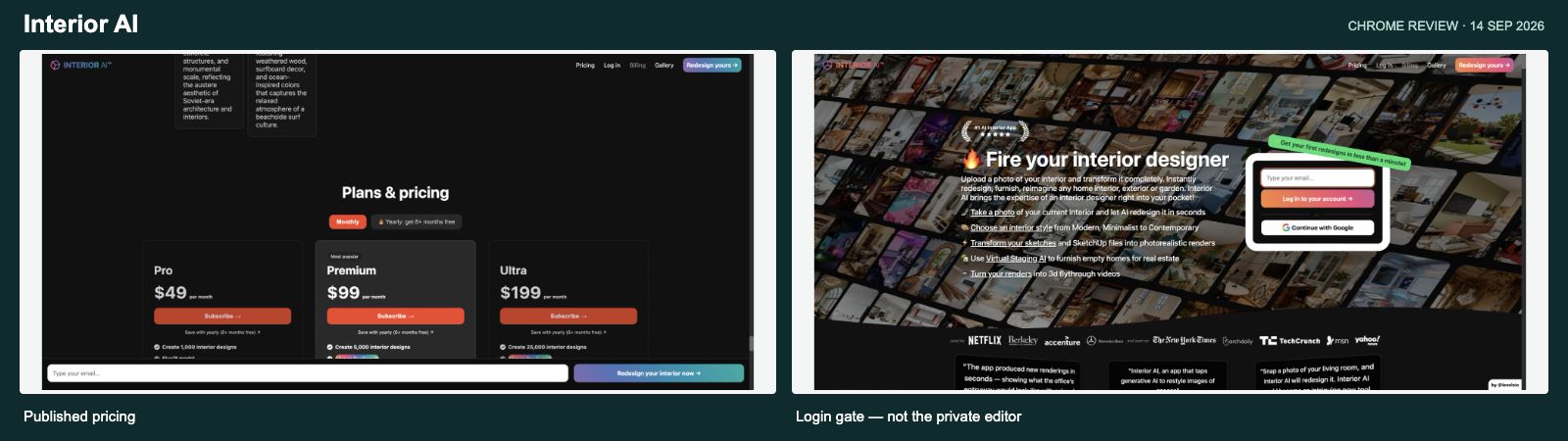
Interior AI advertises much more than room restyling: sketch and SketchUp rendering, exterior and garden design, walkthrough videos and immersive 3D worlds are all part of the pitch. For someone producing lots of concepts or presentations, that is an interesting range. Interior AI features
I couldn’t reach a free production trial. The website says access follows payment, so I stopped there. The screenshot on the right shows the login gate, not a tested private editor, and I can’t give you a firsthand verdict on the output quality.
The plan names need a close read. The $49 monthly Pro plan advertises 1,000 designs with Flux and labels its renders “low quality.” Premium is $99 for 5,000 and adds editing, staging, upscaling, paint, lighting and other features. Ultra is $199 for 25,000. Annual prices shown were $349, $599 and $1,199 respectively. The resulting headline unit costs can be very low, but those tiers are not equivalent models or quality levels. Interior AI pricing
I also found conflicting copy: an older staging section says Pro includes 1,000 stagings for $390 a year, while the current cards show different annual pricing and put staging in Premium. And iPhone users should know the FAQ says HEIC is unsupported, so those photos need converting first. Interior AI website and FAQ
My take: potentially attractive for volume and presentation features, but I’d want the exact model and included tools clear before paying. The cheapest advertised image calculation is not enough to judge value.
REimagine Home: best for a guided staging conversation
Website: reimaginehome.ai
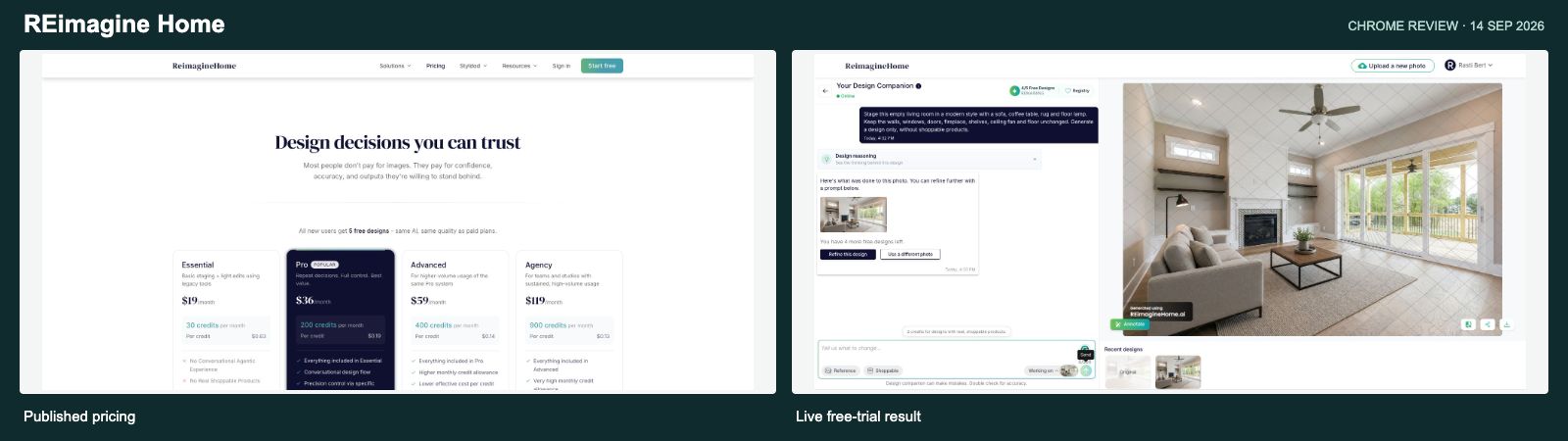
REimagine Home gave me five free credits after signup, without a card. I used its empty-interior sample and asked for a modern living room with a sofa, coffee table, rug and floor lamp, while keeping the windows, doors, fireplace, shelves, ceiling fan and floor.
The result was useful. It furnished the room and kept those main features recognizable. The chat-style input was approachable, and the render used one credit. That is a proper opportunity to see the product work before buying. The free output did have a heavy repeated watermark, and the prompt box had a 500-character limit.
The bigger buying catch is the entry plan. Essential is $19 for 30 credits, but it is the legacy tier and excludes the newer chat, shopping, reference-image and model features. Pro is $36 for 200 credits, Advanced $59 for 400, and Agency $119 for 900. If the chat experience is what sold you, Essential is not the right price to compare. REimagine Home pricing
A basic generated image costs one credit, while a product-discovery-plus-render action costs two. That puts basic images at about $0.13–$0.63 with full monthly use. Pro is $36 ÷ 200 = $0.18 per credit; I used that arithmetic instead of the slightly different unit figure printed on the page. REimagine Home plans and credit explanation
My take: one of the more convincing free experiences I completed. Just budget for the plan that includes the workflow you actually tried.
Collov AI: best for exploring several versions of the same listing photo
Website: collov.ai
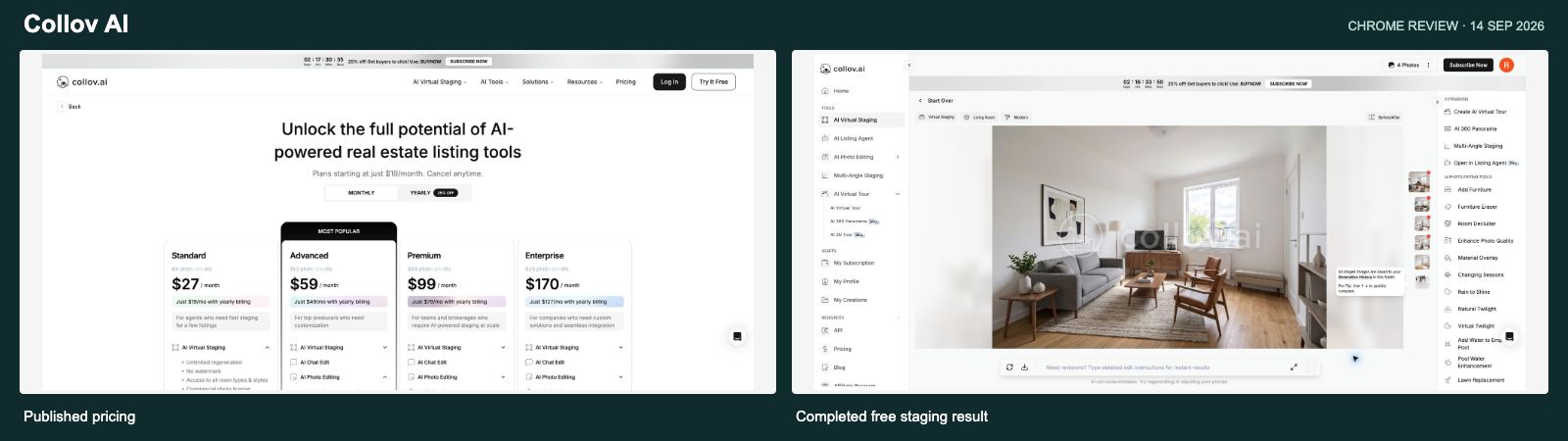
Collov is clearly oriented toward property imagery. Signup through Google gave me five free photos, followed by a short onboarding survey and the staging editor. I uploaded the same empty living room used in NovaVerto and selected Modern staging. It returned four furnishing variations while reducing the allowance from five photos to four. That makes the photo-based pricing much easier to understand.
The result I inspected was convincing: a sofa, chairs, rug, table and TV console, with the original window, radiator, right-hand door and floor still recognizable. The small onboarding snag was a “Furnitures detected!” prompt on this already empty room, with “Remove all items” enabled by default. I switched it off before continuing. The finished images carried a large central Collov watermark, and an upgrade popup appeared after generation.
The paid model is attractive if you want to try several styles on the same room: one staging photo includes unlimited regenerations according to the pricing page. That is different from buying each variation individually. Standard is $27 monthly for 60 photos, or $228 annually, equivalent to $19 monthly. Higher monthly plans were $59/150 photos, $99/263 and $170/526. Collov pricing
The catches are in the extras. Credits don’t roll over. Advanced chat/photo editing is on higher tiers, and tours or other specialist work use additional credits. I also found a FAQ heading referring to ten regenerations while its answer described unlimited regenerations. That deserves clearer wording, even though the main paid offer says unlimited. Collov pricing FAQ
Across the listed monthly and annual plans, the base staging allowance works out to roughly $0.24–$0.45 per new source photo. I wouldn’t call that “the price per image,” because the whole point is that multiple output variations can come from that photo.
My take: one of the stronger free staging tests I completed. The room stayed recognizable, and several options came from one photo allowance. I’d check the editing extras and watermark-free plan before using it for listing work.
Spacely AI: best for designers who want more control
Website: spacely.ai
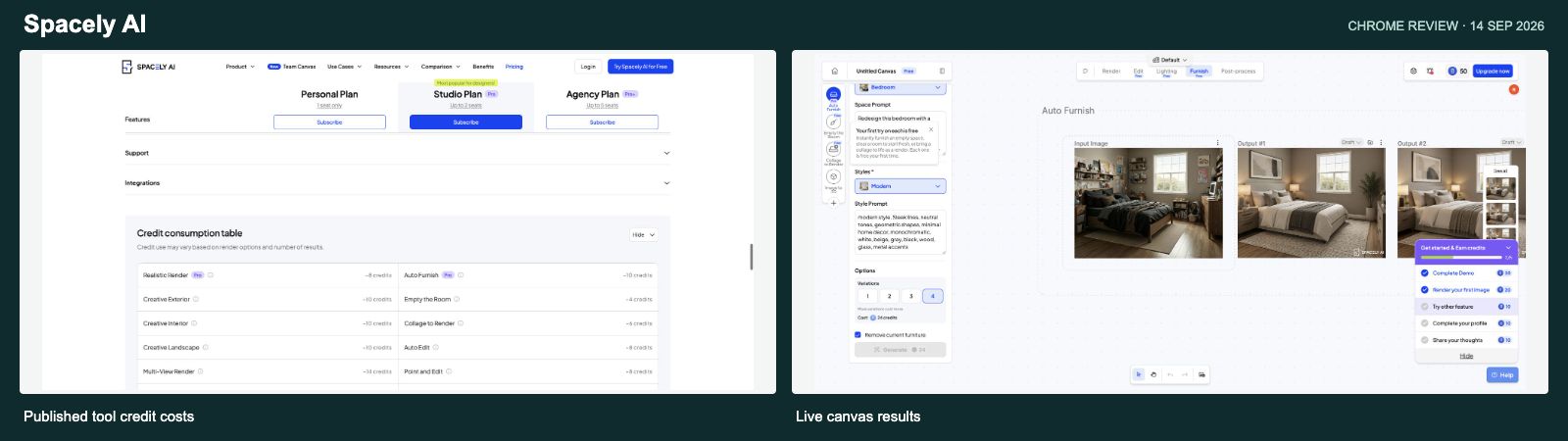
Spacely feels closer to a design workspace than a quick “upload and surprise me” tool. Its canvas, presets, furnishing, removal, editing and rendering options give you plenty to work with. Spacely AI
It also advertises a shared Team Canvas and a SketchUp extension. I didn’t test either, but they’re relevant for a working design studio: professional integrations and collaboration can matter more than the number of room presets or separate tool pages. Spacely team and SketchUp workflows
I went through the guided introduction, then made a real render in the canvas using the supplied bedroom photo. I chose a Modern preset, enabled furniture removal and requested four variations. It produced four usable bedroom concepts. The results had a Spacely watermark, but the furnishings looked coherent and the visible room structure stayed recognizable. The walkthrough examples before that were demonstrations; I’m keeping them separate from this completed generation.
The friction was understanding the credits. The pricing cards estimate about 250 renders from 500 credits, while the detailed tool table quotes substantially different costs for many operations. In the actual canvas, one Auto Furnish variation without removal showed five credits; adding removal raised a single variation to 14, while four variations with removal showed 24 in total. The first use was free in my account, so those were displayed costs rather than deductions. Spacely pricing and tool costs
Personal is $25 monthly for 500 credits, or $240 annually. Studio is $50/1,500 monthly and Agency $100/3,500, with annual discounts. A five-credit action works out to roughly $0.11–$0.25 across those billing options. The four-output, 24-credit setup comes to roughly $0.14–$0.30 per output. Other operations have their own economics. Spacely plans
My take: I’d put it high on a designer’s short list. For a casual homeowner, the introduction and controls may feel like more work. Either way, use the cost shown for your actual setup, not the broad render estimate on a plan card.
HomeDesigns AI: broad features, but a much smaller free tool
Website: homedesigns.ai
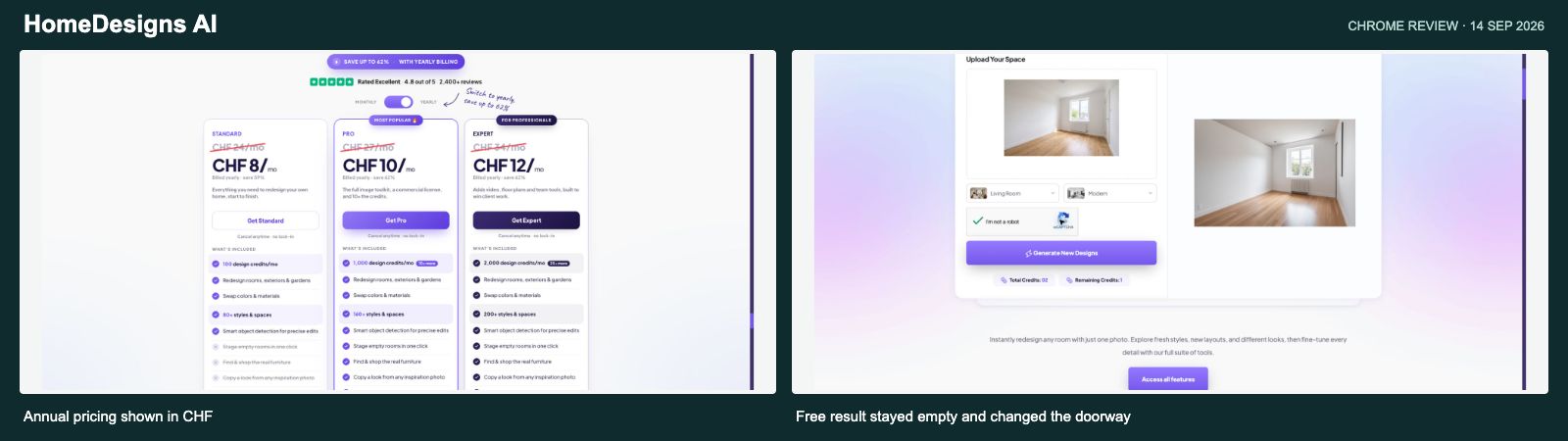
HomeDesigns AI has an extensive paid feature list: interiors, exteriors, gardens, materials, object-based edits, staging, shopping, reference looks and, on higher plans, video and floor-plan tools. It is a serious overlap with NovaVerto’s broad-toolkit approach. HomeDesigns AI
There’s also a separate free tool with two credits and no account required. That is a nice low-friction start. But the controls I actually saw offered just five room types and five styles, while the surrounding free-page copy talked about 120 spaces and 200 styles, plus design modes I couldn’t find in that interface. The broader product may offer those choices; the free controls in front of me did not. HomeDesigns AI free tool
I uploaded the shared empty-room photo and selected Living Room and Modern. The first attempt was interrupted by an expired CAPTCHA. Once verification was completed again, the retry worked and used one credit, leaving one. No signup or payment was needed.
The result was another empty room, with changes to its finishes and details rather than a sofa-and-rug makeover. The window and wood floor stayed recognizable, but the right-hand doorway appeared to become wall decoration, and the radiator changed. So the free tool did generate a restyle, but it wasn’t a faithful furniture preview of the original room. This was its free redesign mode, not a test of the separately advertised staging tool. I wouldn’t infer the paid staging quality from this result.
Prices were localized to Swiss francs in my browser. Monthly cards showed Standard CHF24 for 100 credits, Pro CHF27 for 1,000, and Expert CHF34 for 2,000. Switching to annual showed CHF8, CHF10 and CHF12 per month, billed yearly. Those are the displayed rounded rates; I didn’t enter checkout to verify the exact annual invoice or renewal offer. HomeDesigns AI pricing
The FAQ says a photo redesign uses one credit, matching the deduction in my free test. On that basis, full-use unit costs range from roughly CHF0.006 on the displayed Expert annual rate to CHF0.24 on monthly Standard. But Standard excludes features such as staging and shopping on the cards. There was also a mismatch between the FAQ’s description of staging access and the Pro card, which showed it included. HomeDesigns AI plans and FAQ
My take: useful to try without creating another account, with a broad paid toolkit behind it. My free result was a surface restyle that changed a room opening, so I’d test the exact paid workflow I wanted and check its plan before committing.
MeltFlex: a good free room design, but an empty furniture summary
Website: meltflexai.com
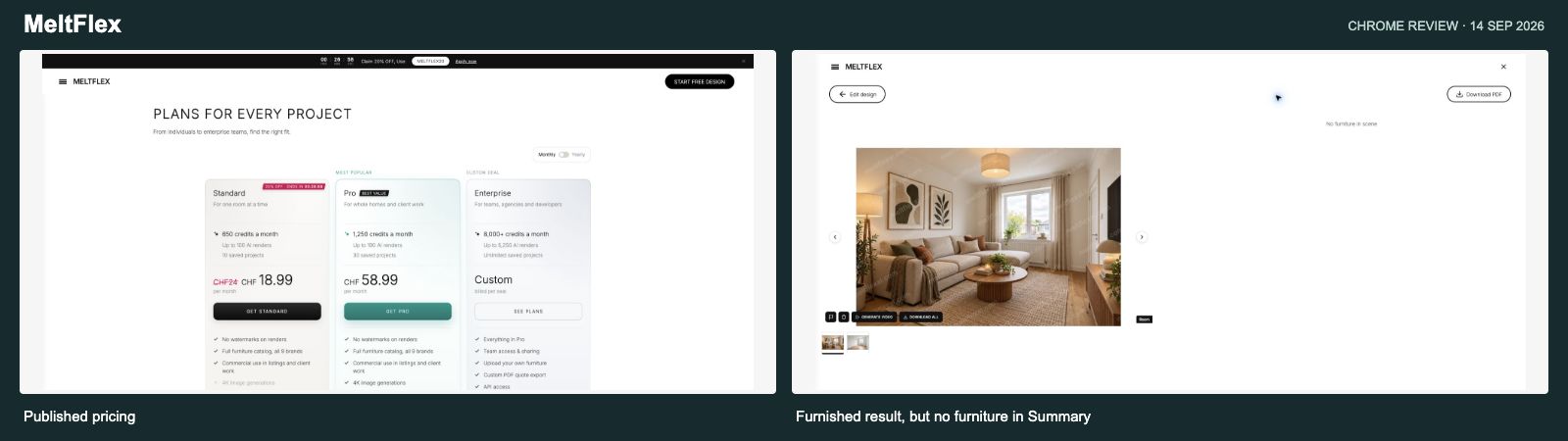
MeltFlex has a web app as well as a mobile presence. Its visible tools cover room design, layouts, exteriors, gardens, furniture changes, floor plans, videos and more. It also advertises a furniture catalog and commercial use. That makes it one of the broader competitors here, rather than a simple single-purpose restyling app. MeltFlex
The public free-start route accepted my room photo and opened an editor before login. I could enter a prompt and choose the model, quality and number of images. Pressing Submit sent me to sign-in, and the photo and request survived that step. After signup, I had a completed Quick/1K design from the same empty-room photo used in NovaVerto.
It was a good-looking result: a sofa, round coffee table, rug, artwork, curtains and warm lighting, with the original window, radiator, right-hand door and floor still recognizable. The free output had a repeated MeltFlex watermark, and the account showed five credits remaining afterward.
The shopping follow-through was less convincing in this particular path. I opened Summary, which displayed the furnished result alongside “No furniture in scene.” So this Quick generation didn’t give me a list of purchasable items. The editor page did list IKEA catalog cards, and the public demo had a product link leading to Google Lens. Those are different experiences; I wouldn’t claim the entire catalog is broken because this result’s summary was empty.
The pricing page showed Standard at a regular CHF24 monthly, reduced to a promotional CHF18.99, or CHF11.99 per month billed annually, with 650 monthly credits and “up to 100” renders. The comparison table uses the regular CHF24 price: CHF24 ÷ 650 × 10 is about CHF0.37 for my Quick setup. Pro showed CHF58.99 monthly or CHF23.99 on annual billing, with 1,250 credits and “up to 190” renders. MeltFlex pricing
Those advertised maximums imply about CHF0.12–CHF0.31 per render across these options. But my single-image, Quick, 1K editor setup displayed 10 credits, which implies about CHF0.18–CHF0.47 across those plans. For example, Standard’s 650 credits would cover 65 such actions, rather than the advertised maximum of 100 renders. I verified the displayed cost and the finished result, but didn’t capture the initial account balance to confirm the deduction independently. The FAQ says renders, chat, floor plans, furniture removal and videos share the allowance, with heavier models and 4K costing more. Unused credits don’t roll over. MeltFlex credit FAQ
My take: a broad competitor with a useful free design result. I’d try the exact furniture workflow I wanted before paying, because my Quick render looked complete while its shopping summary was empty.
Decor8 AI: simple pricing, a surprisingly long road to the paywall
Website: decor8.ai
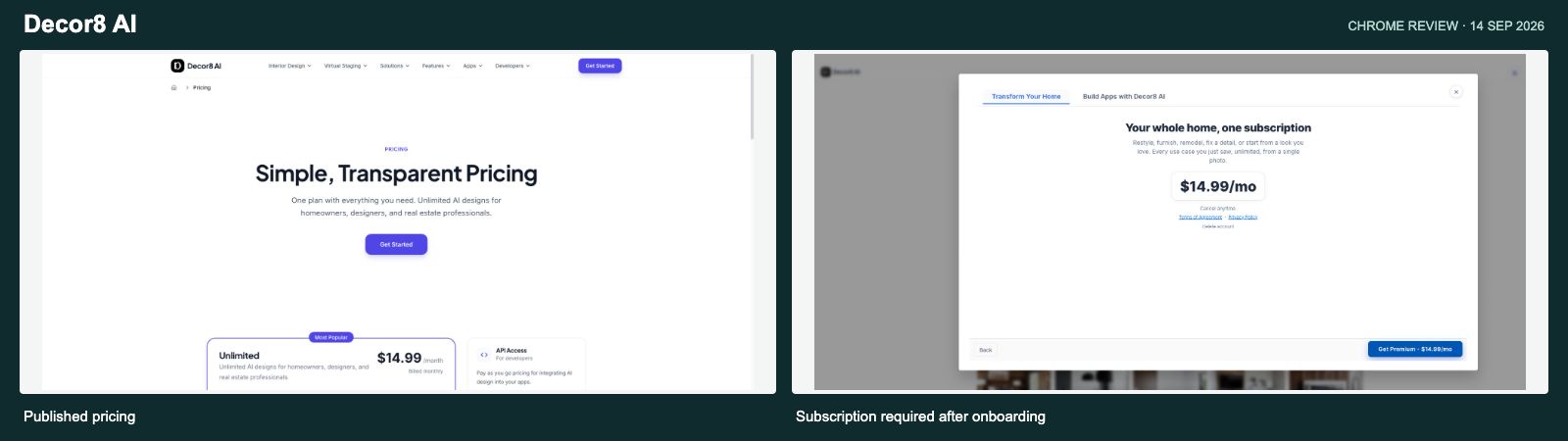
Decor8 makes a straightforward pitch: one subscription for room redesigns, staging, paint and cabinet changes, photo enhancement and more. The same subscription is advertised across web and mobile platforms, and the separate API could be useful for businesses integrating design generation into their own tools. Decor8 pricing
Google signup worked. Then I went through a long series of onboarding slides showing the different capabilities. At the end, I landed on a $14.99/month subscription screen. The close control was explicitly “Close and sign out.” I didn’t find a route from that flow to a free production render.
That is my main criticism: I’d rather know where the paid boundary is before going through so many feature slides. Those slides looked useful, but they were demonstrations, not evidence that I had successfully used the tools.
Decor8 advertises unlimited designs and its FAQ says there are no hidden generation limits. It also claims 20% savings for annual billing, which implies about $11.99 a month from the monthly price, although I didn’t see an exact annual checkout total. With an unlimited subscription, there’s no fixed price per output: 100 images in a $14.99 month would average about $0.15, while ten would average $1.50. The API’s advertised $0.20 per image is a separate offer. Decor8 plans and FAQ
My take: I like the easy-to-understand flat-rate idea. I couldn’t verify production quality without paying, and the onboarding could make that limitation clearer much earlier.
Paintit.ai: best for making a specific change through chat
Website: paintit.ai
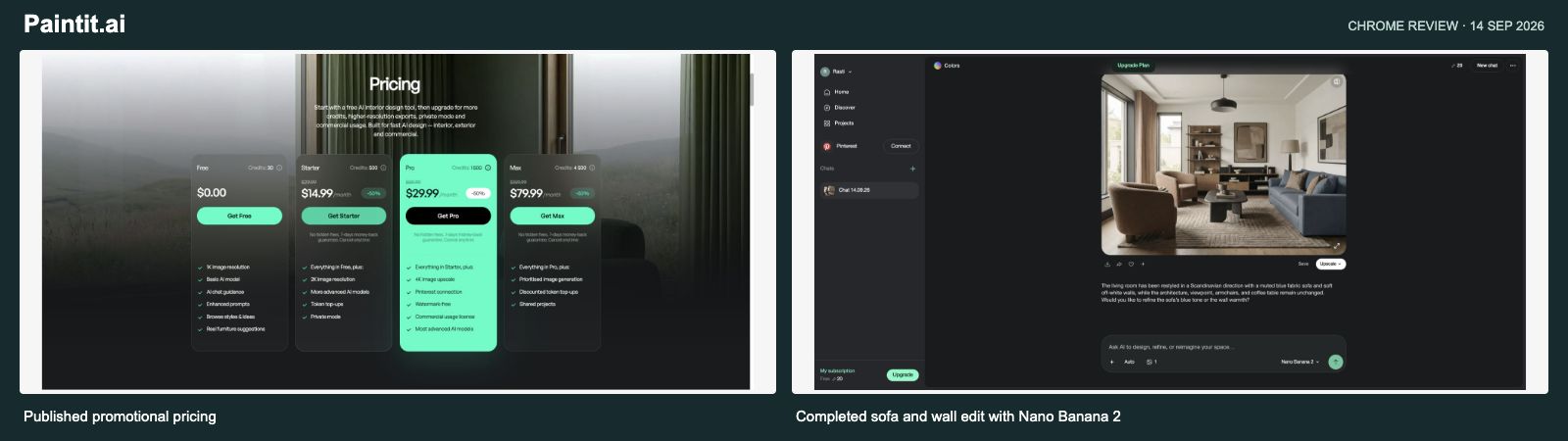
Paintit.ai combines chat-guided design with furniture suggestions. After signup, I received 30 free credits and went through a short onboarding step. The public plan lists basic 1K output, and the website says it supports HEIC, which could remove a conversion step for people using iPhone photos. Paintit.ai
I reused a living room from Paintit’s public community gallery and asked for a fairly specific edit: replace the dark sofa with muted blue fabric, repaint the walls soft off-white, and keep the windows, floor, ceiling, camera angle, armchairs and coffee table in place. With Nano Banana 2 selected, it produced a convincing result. The sofa and walls changed, and the main layout and furniture positions stayed recognizable. The built-in before-and-after slider made that easy to check. My balance went from 30 to 20 credits. The gallery sample used
I liked that the model menu showed the cost before sending: Nano Banana 2 Lite at three credits, Nano Banana 2 at ten, and other choices at ten or fifteen. Nano Banana Pro was listed at twenty credits but locked to Pro. That is useful information, although it also means “30 free credits” doesn’t mean 30 designs. I tested the chat edit and comparison view, not the furniture-matching accuracy.
The key catch is that the entry subscription doesn’t include everything a professional might assume. Starter adds private mode and 2K output; watermark-free exports and commercial use are listed in Pro. The privacy FAQ also explains that private mode gives more control without preventing all service-related access. I’d read that detailed explanation alongside the simpler privacy messaging on the homepage. Paintit.ai plans and privacy FAQ
The public pricing page showed a 50% promotion: Starter $14.99 for 500 credits, Pro $29.99 for 1,500 and Max $79.99 for 4,500, all per month. The regular Starter price before that discount was $29.99 for 500 credits, which is the basis used in the comparison table. That puts the three-credit Lite option at about $0.18 per image and the ten-credit model I tested at about $0.60. Higher models and upscaling can cost more. Credits don’t roll over, and top-ups require an active paid plan. Paintit.ai pricing and credit rules
My take: a good first result for a specific, conversational edit. I’d shortlist it for changing colors or furnishings while keeping a room recognizable, then check the export rights and model cost on the plan I intended to use.
Remodel AI: a useful kitchen result after a failed first attempt
Website: remodelai.app — the ReImage AI product
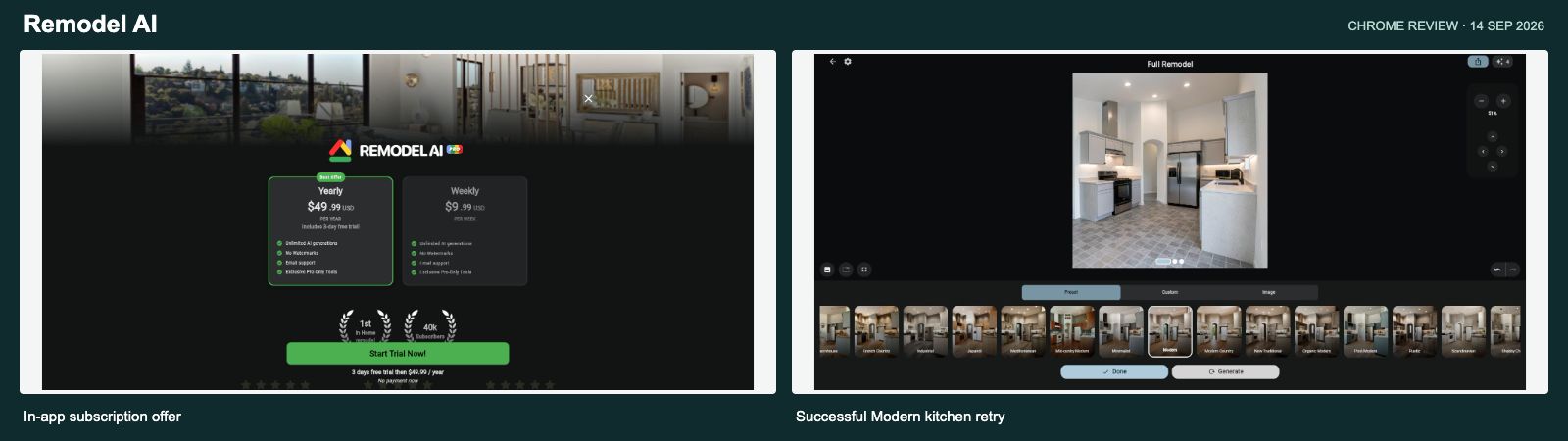
There are several similarly named products, so the domain matters here. I tested the Remodel AI web editor linked from remodelai.app. It offers whole-room remodeling alongside more focused changes to surfaces and objects. Remodel AI
After Google sign-in, the app offered eight free generations as a reward, which I claimed without entering payment details. I first tried its “Paste Image URL” option with my public reference image. That returned an image-loading error, so I switched to its built-in kitchen sample and selected Modern.
The first generation reached “Downloading Results,” then failed with a network timeout. The free counter fell from eight to six. I tried once more, and the retry succeeded, leaving four. I couldn’t confirm a later refund for the failed attempt, so I’m reporting what the counter showed during the test rather than assuming the credits were permanently lost.
The successful result replaced the wood-cabinet look with a light modern kitchen and updated appliances, while keeping the high ceiling, arched opening and main layout recognizable. That was a useful renovation concept. The error handling and failed URL import were the frustrating parts of the experience, but I wouldn’t call the whole product broken after seeing it recover.
The in-app offer showed $49.99 per year or $9.99 per week, advertising unlimited generations. The annual offer included a three-day trial that then renews into the paid plan; I didn’t start it. $49.99 a year is about $4.17 per month, but the weekly option is billed weekly, not monthly. At 100 images per year, the annual plan would average about $0.50 per image; at 1,000, about $0.05. Those are usage examples, not fixed rates or tested throughput. Remodel AI web editor and in-app plans
My take: worth a look for practical renovation inspiration, especially given the free allowance I received. I’d want failed jobs and credit handling to be clearer.
Virtual Staging AI: a focused option for real-estate photos
Website: virtualstagingai.app
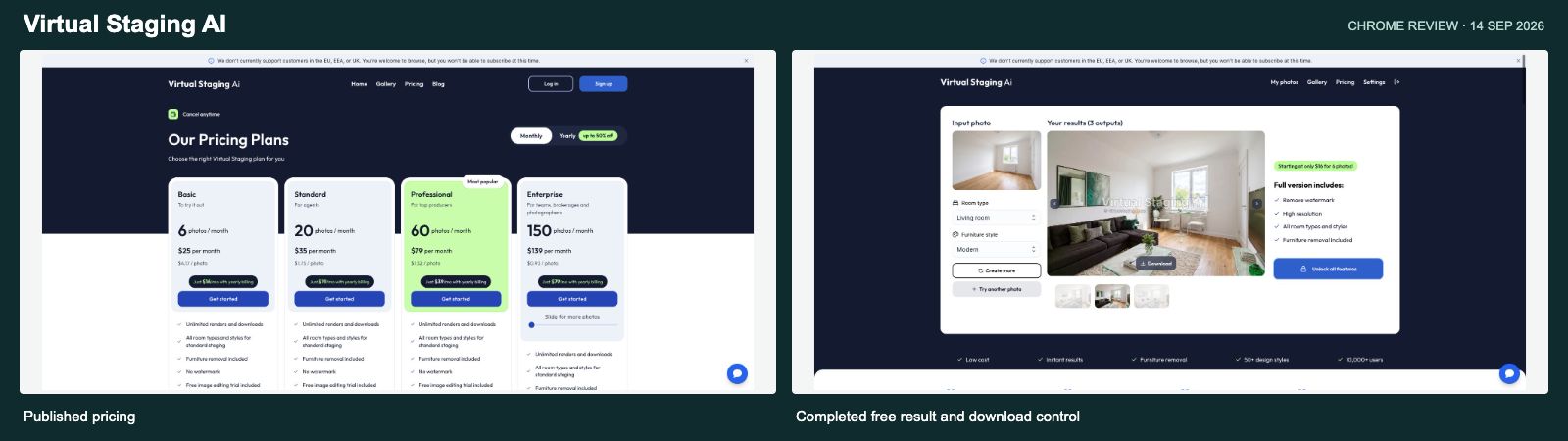
Virtual Staging AI keeps the core use case clear: furnish property photos and try different staging options. Its paid plans include unlimited variations and downloads for each photo, which is helpful if you expect several rounds of feedback. Virtual Staging AI
I created the free account and reached the dashboard. It offered a guided tour, folders and an empty photo library. The small usability snag was finding the next step: I didn’t see an upload control there, so I returned to the homepage’s free-upload entry. That opened the working trial, with sample photos available too.
I uploaded the same empty room used in NovaVerto, chose Living room and Modern, and got three outputs. The two variations I inspected kept the main window, right-hand door and floor recognizable while changing the furniture. Switching between them and downloading a result worked. That is a useful free trial, although the large central watermark makes it a preview rather than a finished listing image.
The free controls were narrower than the wider marketing pitch: Bedroom and Living room were enabled, with eight style choices. Kitchen, home office and several other room types were upgrade-locked. That is worth knowing if your first test room is something else.
The website also displayed a prominent notice that customers in the EU, EEA and UK can browse but cannot currently subscribe. That is a major practical filter for readers in those regions, regardless of how attractive the features look. Virtual Staging AI availability notice
Basic is $25 monthly for six photos, or $192 annually, equivalent to $16 monthly. Standard is $35/20 photos monthly, Pro $79/60, and Enterprise $139/150, with annual equivalents of $19, $39 and $79 respectively. Across these plans, a new source photo works out to roughly $0.53–$4.17. Repeat staging variations are included, so comparing that figure directly with a one-output credit is misleading. Virtual Staging AI pricing
My take: a clear short-list option for staging listing photos if subscriptions are supported where you live. I would judge it around the number of original photos I need each month, not the number of variations I might generate.
What I would actually choose
For a few occasional room ideas, RoomGPT’s one-off packs are easy to understand once you account for quality multipliers—but its Basic result changed my room too much for faithful staging. For a guided free staging experience, REimagine Home gave me a useful result. For designers who want a canvas and more control, Spacely was one of the more substantial tools I actually rendered with. For listing-photo workflows, Collov and Virtual Staging AI both preserved the test room well and produced several furnishing options.
Paintit handled my targeted sofa-and-wall edit well, with a useful comparison slider and a clear ten-credit deduction. MeltFlex also produced an attractive room, although the empty furniture Summary left its shopping follow-through unproven in that test.
NovaVerto is the option I’m building for people who want to move between different home-design jobs and carry an idea into product suggestions and a shopping list. That flow worked in my test, and it also exposed shopping matches I need to improve. HomeDesigns AI and MeltFlex advertise broad toolsets too; claiming that nobody else comes close would go beyond what this research supports.
The biggest lesson for me was that the cheapest plan and the cheapest image are often different things. A cheap tier may leave out the editing tool you want. A credit may buy a basic draft, a fraction of a higher-quality render, or a whole source photo with unlimited variations. And a free sample can tell you something useful without proving that a tool will handle every room you upload.
A final disclosure: I’m the author of NovaVerto. That gives me a reason to care about this category and an interest in my own product. I’ve tried to show the good parts, the awkward parts and the limits of what I could actually test—including NovaVerto’s—and make this comparison as objective as I can. These are practical first-use observations, not independent lab testing or a verdict on every paid feature.
Appendix: what the feature evidence supports
Checked in Chrome on 14 September 2026. This appendix separates a product's published scope from functions exercised in the free trial. A listed tool, room preset, AI model, integration and workflow are different things; adding them into one score would give a misleading ranking.
NovaVerto: 31 focused tool pages, five groups
The current NovaVerto catalog contains 31 distinct tool links. The homepage describes these as one engine with focused tools. This verifies the catalog's breadth, not 31 independently tested technologies.
| Catalog group | Count | Tools listed |
|---|---|---|
| Rooms & furniture | 15 | Interior Design; Style Transfer; Layout Boost; Indoor Planner; Renovation Visualizer; Furniture Changer; Decor Refresh; Lighting Designer; Holiday Decorator; Kitchen Design; Bathroom Design; Office Design; Closet Design; Kids' Room Design; Basement Design |
| Walls & floors | 5 | Walls & Paint; Wallpaper Visualizer; Floor Restyle; Window Planner; Interior Door Planner |
| Outside the house | 5 | Exterior Design; Exterior Door Planner; Garden Design; Outdoor Planner; Balcony Design |
| Real estate & rendering | 5 | Virtual Staging; Declutter & Repair; Photo to Render; Floor Plan to 3D; Floor Plan Creator |
| Business spaces | 1 | Commercial Space Design |
The completed NovaVerto test covered one Quick room design, retailer suggestions and saving a sofa to a shopping list. The output retained the main room openings. Product suggestions included incorrect matches, and the free image was watermarked. The remaining catalog tools were not all generated with.
Appendix: how the alternatives overlap
These are capability examples from official pages and the reached interfaces, not exhaustive inventories. An omitted capability means it was not established in this review; it does not mean the product lacks it. Listed paid capabilities were not unlocked by purchasing access.
| Product and official source | Documented scope relevant to the comparison | Evidence limit or plan distinction |
|---|---|---|
| RoomGPT | Photo redesign, room/style selectors, Basic/Pro/Ultra modes and paid prompt controls | Basic generation and download tested. Pro and Ultra were not tested. Their output cannot be inferred from Basic's architecture changes. |
| Interior AI | Interior/exterior/garden concepts, sketch and SketchUp screenshot rendering, staging, paint, lighting, video and immersive 3D | Public scope only; production access required payment. Several editing and presentation functions are on Premium or higher. |
| REimagine Home | Staging, light exterior/landscape edits, conversation, reference images, product discovery, incremental edits and listing batches | One conversational staging render completed. Essential excludes the newer conversation, reference and shopping features. |
| Collov AI | Virtual staging, furniture removal/addition, material and photo edits, multi-angle staging and tour tools | Four trial staging outputs from one photo. Advanced editing and tours have separate tier/credit considerations. |
| Spacely AI | Canvas-based rendering, furnishing, editing, lighting, enhancement, Team Canvas and a SketchUp extension | Four Auto Furnish outputs tested. Team collaboration and the SketchUp integration are documented, not exercised. These professional workflow features matter beyond room-style counts. |
| HomeDesigns AI | Interiors, exteriors, gardens, materials, selective edits, staging, furniture discovery, sketch rendering, video and floor-plan tools | Free Modern redesign completed after CAPTCHA retry, using one credit. Room remained empty, and the right-hand doorway appeared replaced by decoration. Free choices were five rooms/five styles. Paid staging was not tested. |
| MeltFlex | Interior/exterior/garden work, wall/floor/furniture changes, floor plans, video, furniture catalog, API, CLI and MCP links | Quick / 1K render completed after signup and preserved main room features. Its Summary listed no furniture despite the furnished image. Integration links and catalog cards were not tested end to end. |
| Decor8 AI | Redesign, staging, paint/cabinet visualization, enhancement/upscaling, captions, multiple platforms and a separate API | Signup and onboarding completed; production use required a subscription. The flat-rate app and per-image API are different offers. |
| Paintit.ai | Interior/exterior/staging ideas, chat, furniture suggestions, higher-resolution exports, Pinterest connection and shared projects | Nano Banana 2 edit changed sofa and wall colors while retaining the main layout; 10 credits deducted. Furniture matches and paid exports were not tested. Commercial use and watermark-free exports are listed in Pro; shared projects in Max. |
| Remodel AI / ReImage AI | Full-room renovation concepts, presets/custom input, reference-image and focused surface/object workflows | A Modern kitchen render succeeded after a timeout. The named domain matters because similarly named products exist. |
| Virtual Staging AI | Property-photo staging, furniture removal, multiple styles and variations, folders, plus API/whitelabel offers | Three free outputs and a download completed. Only two room types and eight styles were enabled in the free test. |